1. Segmenting your visitors. Nothing is more powerful than segmenting your visitors and examining the different trends these visitors follow on your site. At a minimum, you should segment visitors by source of traffic, keyword, type of visit (new vs. returning) and country.
2.
Segmentation with Google Website Optimizer = Testing on Steroids! Not all customers are created equal, nor should you deal with all customers equally. Testing different versions of your page or funnel is powerful. Testing different versions based on the type of visitors is even more powerful. There are different ways of doing this, but we recommend starting with
BTBuckets or
with these instructions.
3. Setup your funnels. Funnels tell you what pages are causing visitors to exit the site. At a minimum, we recommend you setup the following funnels:
- Home page to cart page funnel
- General checkout process funnel including the cart page
- General checkout process funnel excluding the cart page
- Checkout process funnel for different payment types including the cart page
- Checkout process funnel for different payment types excluding the cart page
4.
Funnels & visitors. Beyond setting up funnels is segmenting your traffic and examining how it moves in funnels. But how do you do that in Google Analytics? We will let you in on a small secret:
- Setup the different funnels in Google Analytics
- Setup different profiles to represent the different segments
- Now, you can examine each of the funnels for the different profiles
5. Returning visitors vs. new visitors. Comparing different segments of visitors can be confusing. You should expect visitors from organic search to interact differently with your site compared to visitors from paid search. We find that segmenting new visitors versus returning visitors can reveal major design problems in the site. Generally returning visitors will take longer on a site, view more pages, and have lower exit and bounce rates. If that is not the case, then you might have major design issues to deal with.
6. Product pages: A micro conversion. We like to run the product pages tests twice with different conversion goals:
- Micro conversion goal: When a visitor adds an item to the cart, we count that as a micro conversion.
- Macro conversion: When the visitor completes an order, we count a macro conversion.
7. Product pages: the image. Yes, you heard it before. An image is worth a thousand words. However, product images do require an investment, so test the correct solution for your website. Each of the options below will require considerable time, software, and resource commitment. So, test with 5 to 10 products before choosing the right solution for your website.
8. Product pages: Image of product in use. Test with showing the product in use vs. images with solid backgrounds. While in many cases showing the product in use helps the visitors see themselves use the particular product, this is not the case for all products. Apparel websites seem to benefit from this feature. Electronics or book websites, not so much!
9. Product pages: Location of the image. Where should you place the product image? Common wisdom is to place product images on right side of product pages. But common wisdom fails to predict how visitors will act on your website. So test placing the image on left versus the right and see which converts better.
10. Product pages: Product zooming. If you have the software installed on your website, then allowing visitors to zoom in and examine the product closely is an excellent feature to add.
11. Product pages: Multiple product images. Finally, consider having multiple images of the product. We usually recommend having 3-4 images per product to start with. But a word of caution here: hire a professional photographer for these images. Having several low quality images versus a single high quality image is something worth thinking about.
12. Product pages: your product descriptions. Most e-commerce stores take the product description from the manufacturer and place it on the site. So, you will find the same description on competing e-commerce stores. Pick your top 10 best selling products and:
- Test the impact of having the standard manufacturer's description versus custom copy your team creates. What impact does this have on the micro conversion (visitors adding items to their cart)?
- Test different versions of the custom copy you create: Not all copy created equal. You might want to test technical copy versus non-technical. Consider the different market segments and what words will have the most impact on them.
13.
Product pages: Reviews. Reviews are great for increasing conversions. There are many studies that show product reviews are responsible for up to 30% uplift in conversions. However, if you are just starting out, allow customers to add reviews but do not display them right away. Wait for a product to collect enough reviews before sharing them with your visitors. Consider using services such
ProductWiki to add images on your site.
14. Product pages: add to cart buttons. Yes, they do impact conversion. And there are many things you can test with these:
- Test the location of the add to cart button
- Test different designs of the add to cart button
- Test the wording on the add to cart buttons
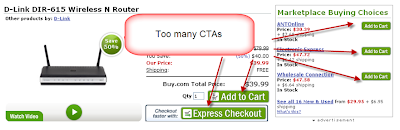
15. Product pages: don’t overdo it! What do you think of this?
Too many CTAs (call to actions) can stop a visitor in their tracks.
16. Product pages: cross-sells and upsells. We know that you want to sell more of your products. Cross-sells and upsells can help you do that, but they also can distract the visitors. So, test the placement of cross-sells and upsells on your product pages. Should they go in the left navigation or somewhere in the middle section of the product pages?
17. Product pages: pricing. Most of your visitors will do some sort of comparison shopping. So, test different prices and see what impact that will have on your conversion rates. We had a client who reported a 135% increase in conversion rate by lowering product prices by 10%. We do not like to focus on pricing as a mechanism to increase conversion rates but sometimes it works really well.
18. Poor man testing: pricing & Google Website Optimizer. It is usually difficult to switch back and forth between different pricing for items, but here is a general framework to help you:
- Most ecommerce packages provide a way to maintain a single price for a product. Plan on a strategy for testing multiple prices:
- Price A is the original price
- Price B is the original price x 1.10 (10% increase)
- Price C is the original price x 0.90 (10% decrease)
- Price A (original is already saved in your database). You can either maintain Price B, C in the database or have application logic to switch between the different prices for a single item.
- One option to implement this is to have all prices available on the page and use GWO to display one price and hide the other two prices. Another option will be to use GWO to pass a variable value to be used in a formula to change the price.
- Implementing this should take less than a day and will provide a mechanism to test prices in Google Website Optimizer.
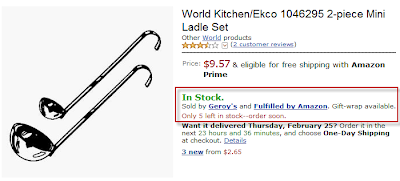
19. Product pages: stock availability. This is a no brainer. No customer likes to add an item to their cart only to discover later that the item is out of stock. So, tie your front end e-commerce store to your inventory system. If that is too much, then consider a daily update.
- Bad: No product availability on your site
- Good: Always display product availability
- Excellent: Display messages to encourage customers to buy a product if you have limited stock available (Only 5 left in stock -- order soon.)
20. When can I have it? Tell visitors when the product will be in their hands. Do not tell visitors the items will arrive 3 to 10 days. That will simply kill your conversion and if it does not, it will irritate visitors.
21. Product pages: Feature list.
The first level of attracting customers is features. Features are the facts about a given product. Features of an outdoor grill might include:
- Electric
- Grease tray
- Non-stick cooking surface
- Temperature control
- 300 square inches of cooking space
- Attached working surface
22. Product pages: The benefit list. Benefits start you on the road to closing a sale. The benefits of the above outdoor grill include:
- Convenience
- Electric
- Non-stick cooking surface
- Attached working surface
- Easy to Use:
- Electric
- Non-stick cooking surface
- Temperature control
- Attached working surface
- Saves Money
- Electric
- Temperature control
23. Product pages - People buy benefits, they do not buy features. What results do your customers want from your barbeque? They want a grill that offers:
- Tasty, Healthy Food Every time
- Temperature control
- Grease tray
- Perfect for Easy Entertaining
- 300 square inches of cooking space
- Attached working area
- Easy to clean
- A Double Bonus: Environmentally Friendly While Saving You Money!
- Electric versus charcoal emissions
- Do not have to buy charcoal for the life of the grill
24. Bundled pricing. Consider bundling shipping costs with product items so visitors will not have to worry about paying for shipping costs. If the shipping costs are too complicated to understand or might be on the high side, we recommend testing bundling them with the product price.
25. Free shipping is a great way to increase sales. We have many clients who offer free shipping on orders above a certain size and usually see a nice uplift in both conversions and average order value by doing so.
26. Bonus tips: If you are about to start conversion rate optimization, then these resources are a must: